
Curio 34 Press Kit
Capture More Than Notes
Curio is a freeform notebook for macOS that gathers your notes, research, and documents into a single local project file, with integrated tools for brainstorming, outlining, mind mapping, and task tracking.
28 MB · updated September 10, 2026
What’s in the Kit
The fact sheet, ready-to-use copy, screenshots, feature images, and brand assets are bundled into a single download. The feature captures and screenshots are full-resolution and unframed; the kit also includes a device-framed hero image.
- Screenshots: the device-framed hero image, plus six full-resolution, unframed PNG captures of Curio 34 at 2880 × 1800.
- Curio 34: feature captures of Kanban boards, the Curio CLI, macOS widgets, table formulas, and more.
- Brand: the Curio app icon at 512, 256, and 128 pixels, plus the Zengobi logo as PNG and SVG.
- README.txt: fact sheet, boilerplate, and press contact.
Curio screenshots and app icons may be reproduced in articles, reviews, and roundups about Curio without asking us first. If you need something that isn’t here, including a review license, just ask.
Fact Sheet
- App
- Curio 34
- What it is
- Curio is a freeform notebook for macOS that gathers your notes, research, and documents into a single local project file, with integrated tools for brainstorming, outlining, mind mapping, and task tracking.
- Platform
- macOS 15 Sequoia through macOS 27 Golden Gate, on Apple silicon or Intel (universal binary)
- Curio 34 release
- September 1, 2026
- First released
- Curio 1.0 shipped in 2004 and has been in continuous development since.
- Price
- License keys from $79.99 to $119.99 (one-time, includes a year of updates). Mac App Store subscriptions from $5 per month billed yearly. Free 2-week trial; free mode afterward.
- Editions
- Curio Standard and Curio Professional. Curio Pro sustainers (customers with an active subscription or a license still inside its update year) also get the Curio CLI and MCP server.
- Developer
-
Zengobi, Inc., North Carolina, USA
Zengobi is a one-person company run by George Browning, who has developed Curio full-time since 2002. - Website
- https://www.zengobi.com/curio/
- Website download
- https://www.zengobi.com/curio/download?v=34
- Mac App Store
- https://apps.apple.com/app/curio/id1475550603
- First launch
- Curio starts a 2-week trial with every Professional feature enabled, and opens the bundled Welcome to Curio project on first launch for a guided tour.
- Documentation
- https://www.zengobi.com/curio/docs/34/
- Release notes
- https://www.zengobi.com/curio/releasenotes/?v=34
- Curio CLI
-
https://www.zengobi.com/curio/cli/
Documentation · Examples · Release notes · Download - Videos
- https://www.zengobi.com/videos
- Press release
- zengobi.com/curio/press/34/, the Curio 34 announcement, dated September 1, 2026, with a plain-text version for pasting into a CMS and a zip of its images.
- Press kit download
- Curio34PressKit.zip, with the press copy and downloadable assets in one archive, 28 MB, updated September 10, 2026.
- Press contact
- George Browning, Founder, Zengobi, Inc.: george@zengobi.com
About Curio
Copy freely: these blocks are written to be pasted straight into an article.
Short description (one paragraph)
Curio is a freeform notebook for macOS. Create a project for anything you’re working on, then bring together rich text and Markdown notes, images, PDFs, documents, web links, audio, and video. Arrange everything on flexible idea spaces in whatever way best fits the work.
Standard boilerplate (three paragraphs)
Curio is a freeform notebook for macOS. Create a project for anything you’re working on, then bring together rich text and Markdown notes, images, PDFs, documents, web links, audio, and video. Arrange everything on flexible idea spaces in whatever way best fits the work.
When you need organization, use built-in mind maps, lists, tables, index cards, albums, pinboards, stacks, and Kanban boards. Add tags, dates, priorities, ratings, checkboxes, progress, and custom fields to make your material easy to find and track.
Each Curio project is stored as a single file on your Mac. Curio requires no account and does not upload your project contents. Extensive import, export, and printing options keep your work usable outside Curio.
Background (context and history)
Most note-taking apps ask you to choose a shape before you start: an outline, a document, a card, a canvas. Curio doesn’t. A Curio idea space is a freeform canvas where a paragraph of text, a scanned handout, a mind map, a table of lab results, and a to-do list can sit side by side, positioned however the work actually makes sense to you.
Curio is built by solo indie developer George Browning. He began work on it in 2002, shipped Curio 1.0 in 2004, and has developed it continuously ever since. Its diverse customer base includes designers gathering inspiration and client requirements, writers brainstorming plot and character development, students taking notes and annotating handouts, professors building and presenting lesson plans, scientists collecting lab results, project managers tracking feature checklists, lawyers preparing cases, and entrepreneurs mapping out new companies.
Curio 34 adds Kanban boards that generate their own sorted stacks from any grouping you choose, Excel-style table formulas, project-specific tag sets, paragraph and character text styles, macOS widgets, and built-in Shortcuts actions. Curio Professional sustainers also receive the new Curio CLI and its built-in MCP server, which give Terminal scripts and AI agents direct, programmatic access to Curio projects.
Key Features
What Curio does
- Arrange anything anywhere on freeform idea spaces.
- Build mind maps, outlines, lists, tables, index cards, albums, pinboards, stacks, and Kanban boards.
- Work with rich text and Markdown, images, PDFs, documents, web links, audio, video, equations, and diagrams.
- Spread a PDF across idea spaces to annotate and take notes page by page.
- Track work with tags, tag sets, checkboxes, priorities, ratings, resources, and start/due dates.
- Connect ideas with wikilinks, backlinks, deep links, and cross-references.
- Find what you need with fast, relevance-ranked search, fuzzy matching, and query-based collections.
Why Curio
- One integrated workspace. Brainstorm, research, plan, write, and present without scattering your work across unrelated apps.
- Local and offline-ready. Your projects are files on your Mac, under your control.
- Flexible and visual. Start with a blank canvas, or use built-in collections, templates, and styles to give ideas shape.
- No lock-in. Extensive import, export, and printing options keep your work usable elsewhere.
- Made for deep work. Researchers, writers, students, educators, designers, project managers, and engineers use Curio to develop ideas, collect sources, plan projects, take class notes, prepare presentations, and track work.
What’s New in Curio 34
The summaries below are ready to paste into an article: choose one sentence, one paragraph with pricing and system requirements, or three paragraphs. The full release notes cover dozens more improvements and fixes.
Release summary (one sentence)
Zengobi has released Curio 34, adding Kanban boards, Excel-style formulas for native and Markdown tables, and a new command-line tool with a built-in MCP server for scripts and AI agents; see the release notes for full details.
Release summary (one paragraph, with the facts)
Zengobi has released Curio 34 with Kanban boards, table formulas, and a new command-line tool. The freeform notebook for macOS now builds Kanban stacks from a chosen grouping such as priority, rating, tags, or dates; evaluates Excel-style formulas in native and Markdown tables; keeps copied lists, mind maps, and stacks synchronized; and adds project-specific tag sets, project-wide text styles, macOS widgets, and built-in Shortcuts actions. Curio Professional sustainers also get the Curio CLI and its built-in MCP server, a separate free download that gives Terminal users, scripts, and AI agents programmatic access to Curio projects. ($119.99 new for Curio Professional, $99.99 for Curio Standard; academic and volume discounts; upgrades from $59.99; Mac App Store subscriptions are $6 per month billed yearly or $8 billed monthly for Professional, $5 per month billed yearly or $6 billed monthly for Standard; free 2-week trial; release notes; 78.1 MB; macOS 15+ on Apple silicon or Intel.)
Release summary (three paragraphs)
Zengobi has released Curio 34, a major update to its freeform notebook for macOS. First released in 2004 and in continuous development ever since, Curio stores each project as a single local file. Its freeform idea spaces let people arrange notes, PDFs, images, mind maps, tables, and Kanban boards wherever the work makes sense.
Version 34 focuses on organizing, connecting, calculating, and automating. Kanban boards build stacks from a chosen grouping such as priority, rating, tags, or dates, while Curio Professional adds Smart Kanban boards that gather matching items from across a project. Native and Markdown tables gain Excel-style formulas with structured references. Professional sustainers also get the Curio CLI and its built-in MCP server, a separate free download that gives Terminal users, shell and Python scripts, and AI agents programmatic access to Curio projects. Other additions include project-specific tag sets; synced collection instances that keep copied lists, mind maps, and stacks synchronized; project-wide paragraph and character styles; macOS widgets; built-in Shortcuts actions; and improved search relevance and field autocomplete.
Curio 34 requires macOS 15 Sequoia through macOS 27 Golden Gate, on Apple silicon or Intel (universal binary). A license key is a one-time purchase that includes a year of updates: $99.99 for Curio Standard or $119.99 for Curio Professional. Academic and volume discounts are available, and upgrades start at $59.99. Mac App Store subscriptions are $6 per month billed yearly or $8 billed monthly for Professional, and $5 per month billed yearly or $6 billed monthly for Standard. A free 2-week trial enables every Professional feature. Afterward, Curio continues in free mode with Standard features for projects of up to five idea spaces; larger projects open read-only for viewing, exporting, and printing. The download is 78.1 MB. Full details are available in the release notes.
Feature Images
Captures of the new features, sized for inline use in an article. Each title links to its documentation.
-
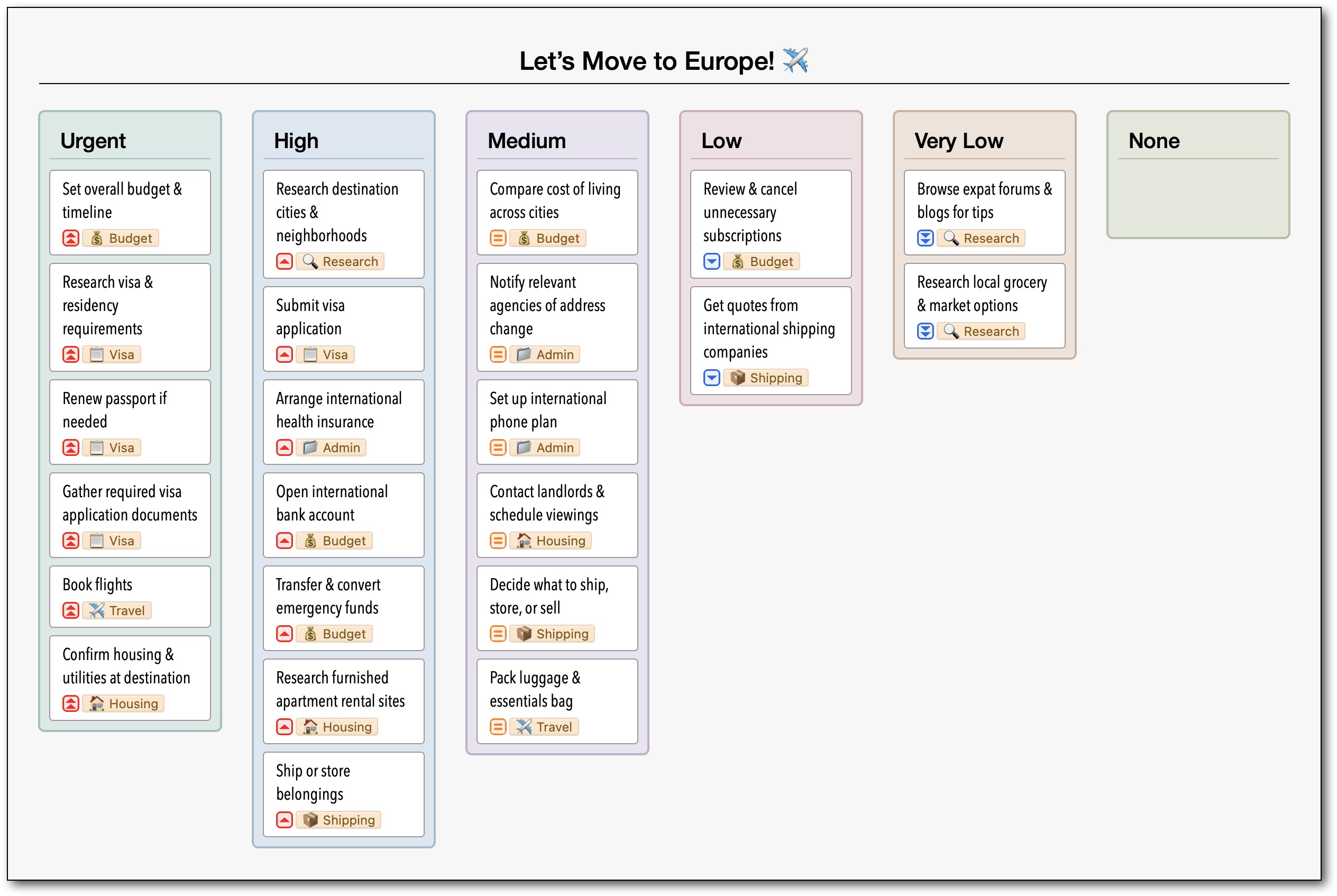
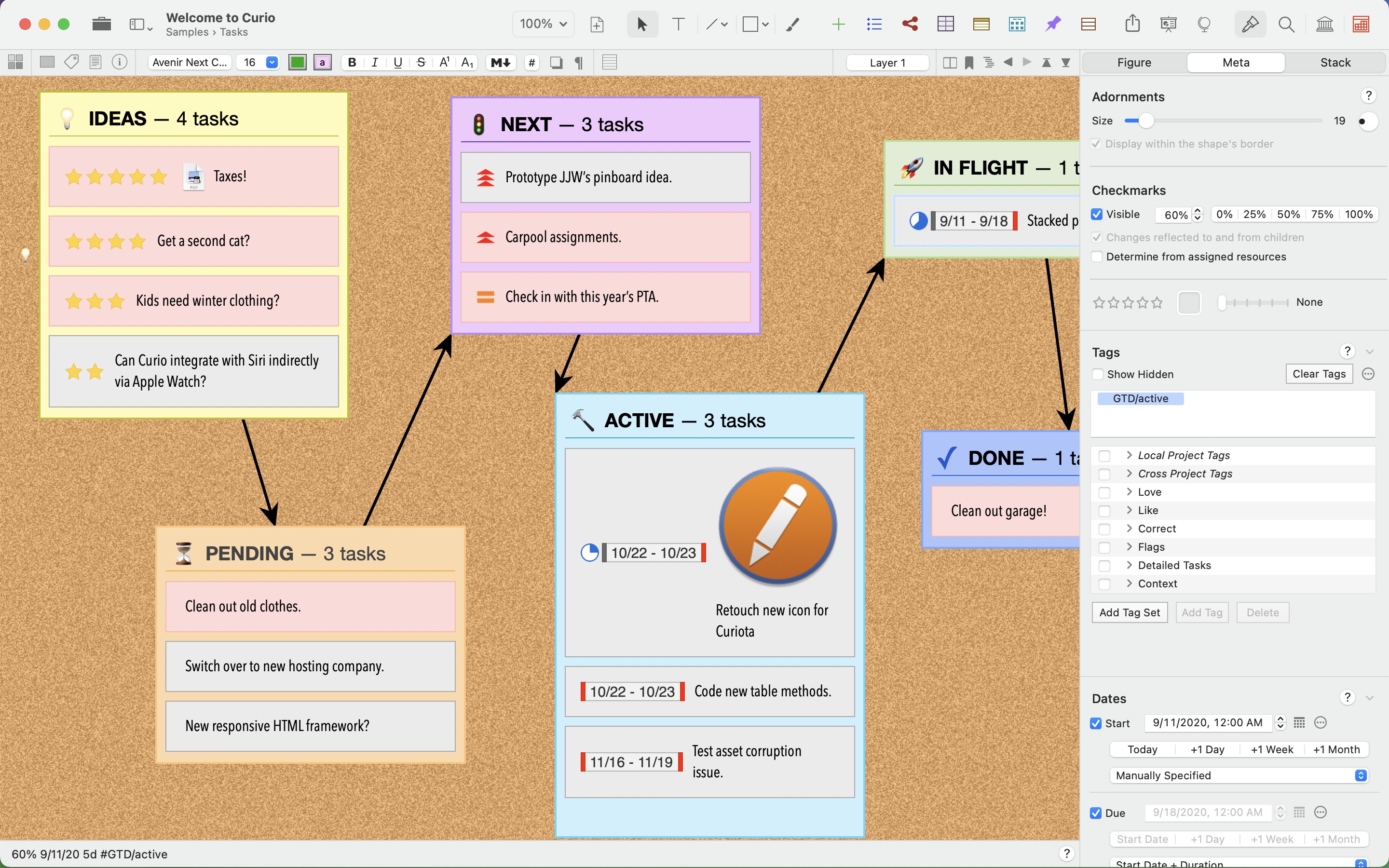
Kanban Boards A new collection type that generates one sorted stack per value from the grouping you choose, such as priority, rating, tag set, or dates like start, due, and last modified. Here it’s grouped by priority, with a fallback stack for items without a priority; dragging a card to another stack changes the underlying priority to match its new home.
-
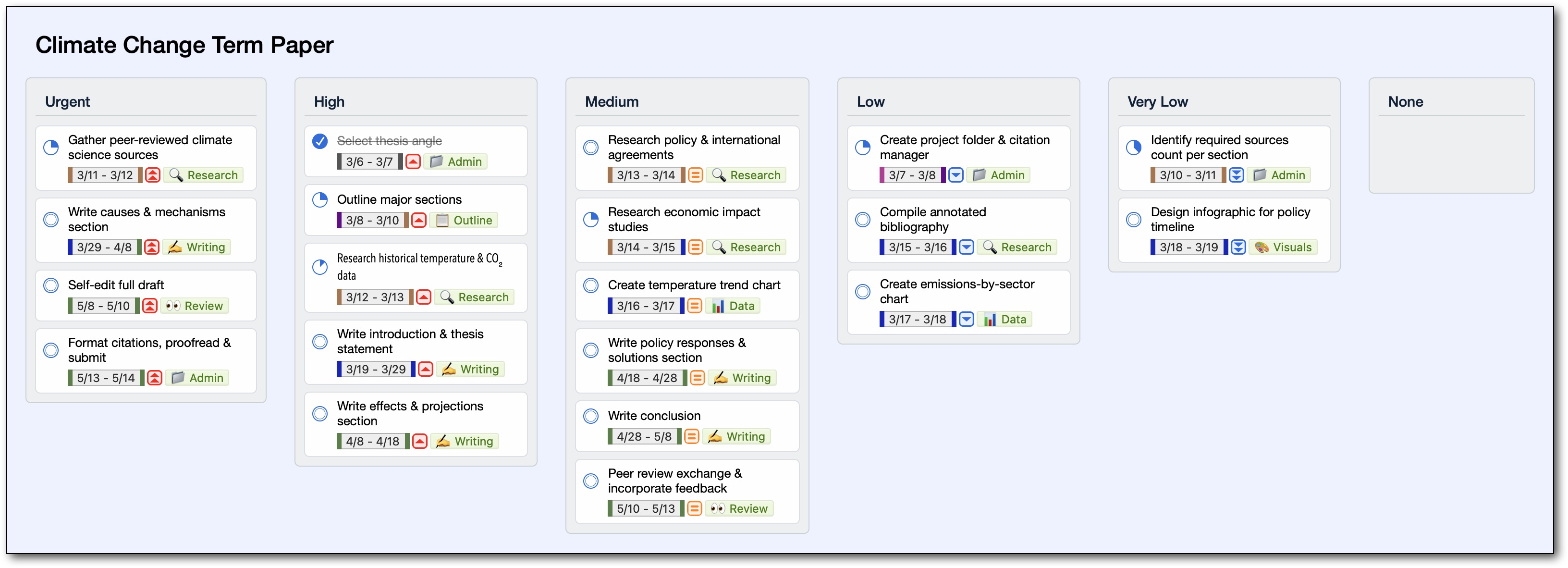
Smart Kanban Boards Pro Curio Pro backs a Kanban board with a search query, gathering matching figures from anywhere in the project into synced instances that stay linked to their originals.
-
![Excel-like formulas evaluated inside a Curio Pro table, written with column names rather than A1-style coordinates. A current-row formula like =[@Price]*[@Quantity] fills its whole column, and a whole-column one like =SUM([Quantity]) totals the column in the footer. Common math, statistical, and text functions are included.](../../releasenotes/images/3400/TableFormulaRendered@2x.jpeg)
Table Formulas Pro Excel-like formulas evaluated inside a Curio Pro table, written with column names rather than A1-style coordinates. A current-row formula like
=[@Price]*[@Quantity]fills its whole column, and a whole-column one like=SUM([Quantity])totals the column in the footer. Common math, statistical, and text functions are included. -
![The same column-based formulas work inside a rendered Markdown table and are recomputed as the data changes. They include TEXT number formatting, as in =TEXT(SUM([Sales Tax]),"$#,##0.00"), an unusual capability among Markdown editors and renderers.](../../releasenotes/images/3400/MarkdownTableFormulaRendered@2x.png)
Markdown Table Formulas Pro The same column-based formulas work inside a rendered Markdown table and are recomputed as the data changes. They include
TEXTnumber formatting, as in=TEXT(SUM([Sales Tax]),"$#,##0.00"), an unusual capability among Markdown editors and renderers. -
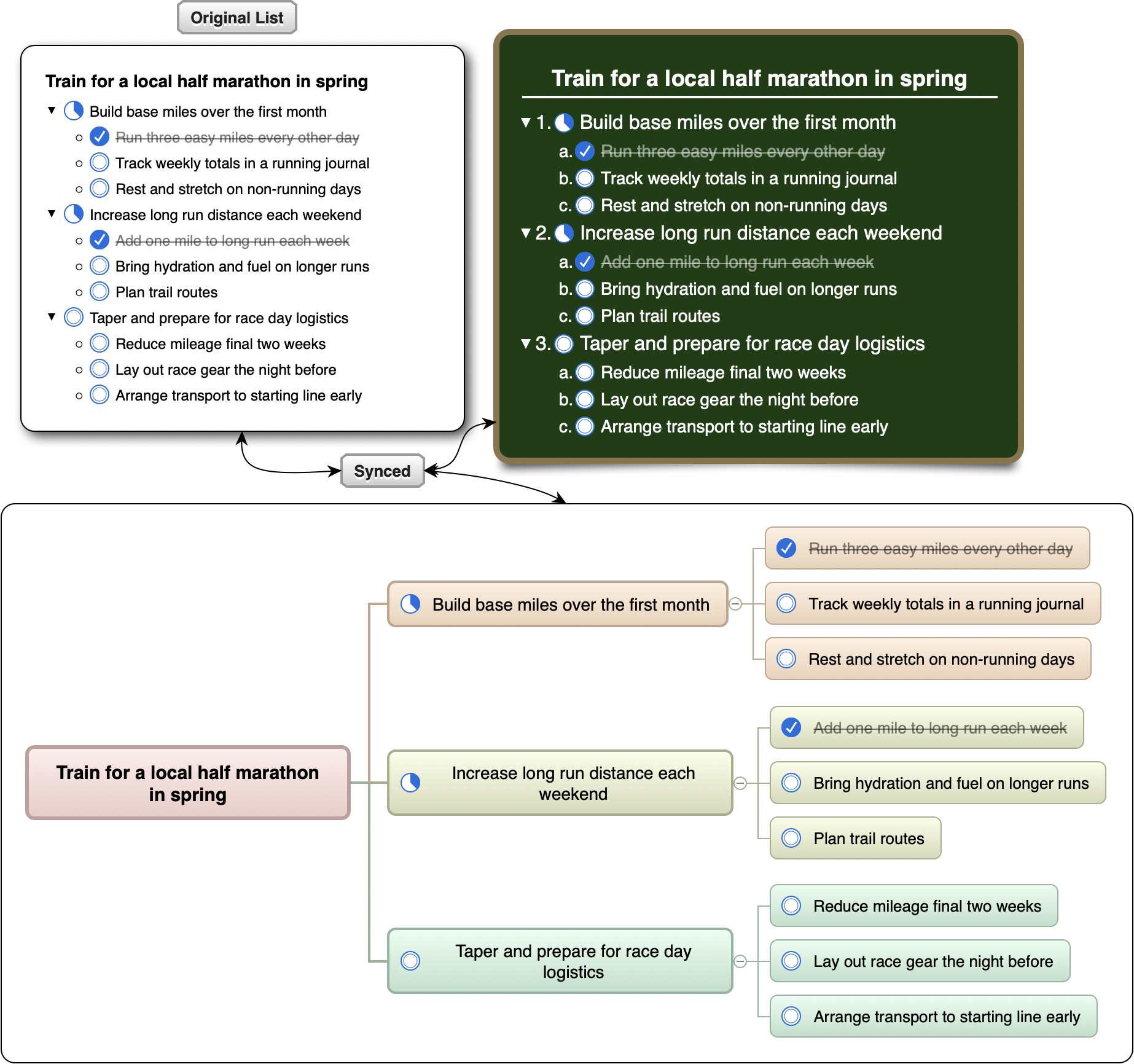
Synced Collection Instances Pro One list, three views. A Curio Pro synced instance can carry its own styling or take an entirely different shape, like a mind map, while item text, checkboxes, and progress stay synchronized with the original.
-
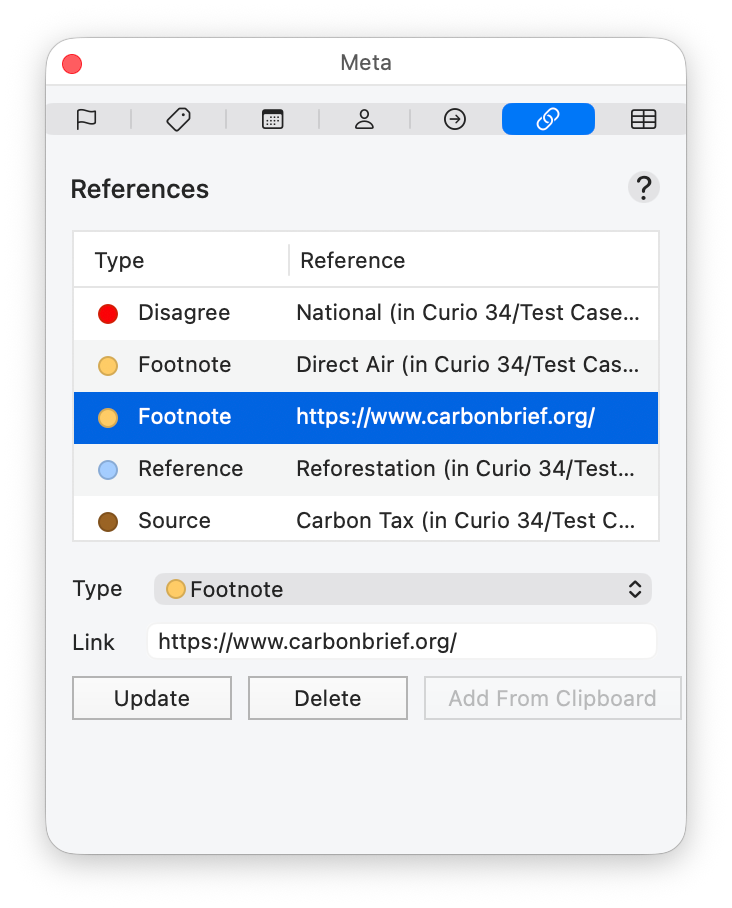
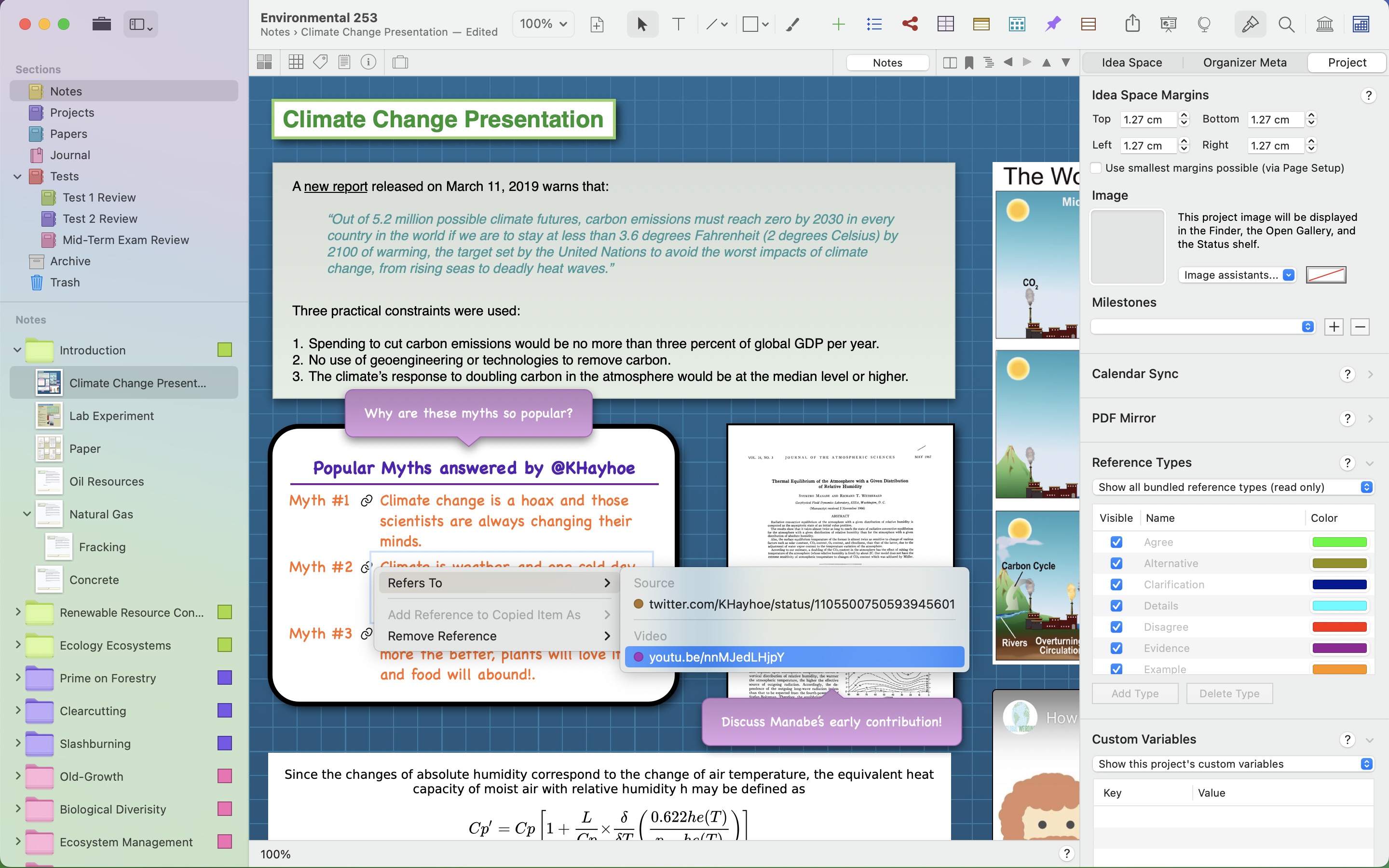
References Panel Pro The new References inspector panel attaches references, organized by type, to a figure using Curio jump targets or web URLs from the clipboard. This builds a cross-reference layer over a project without changing its visual layout.
-
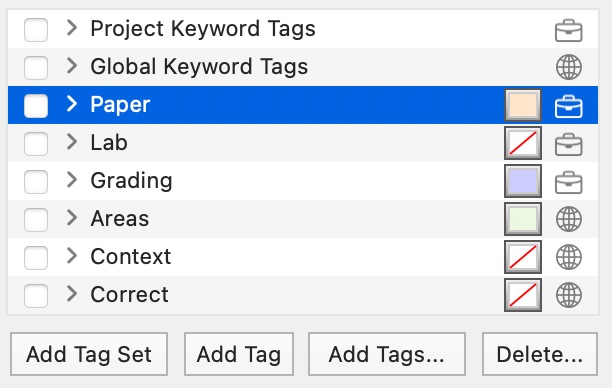
Project Tag Sets Tag sets for a single project sit alongside global ones. Briefcase and globe icons distinguish them, and their colors and ordering are preserved when used to group a Kanban board.
-
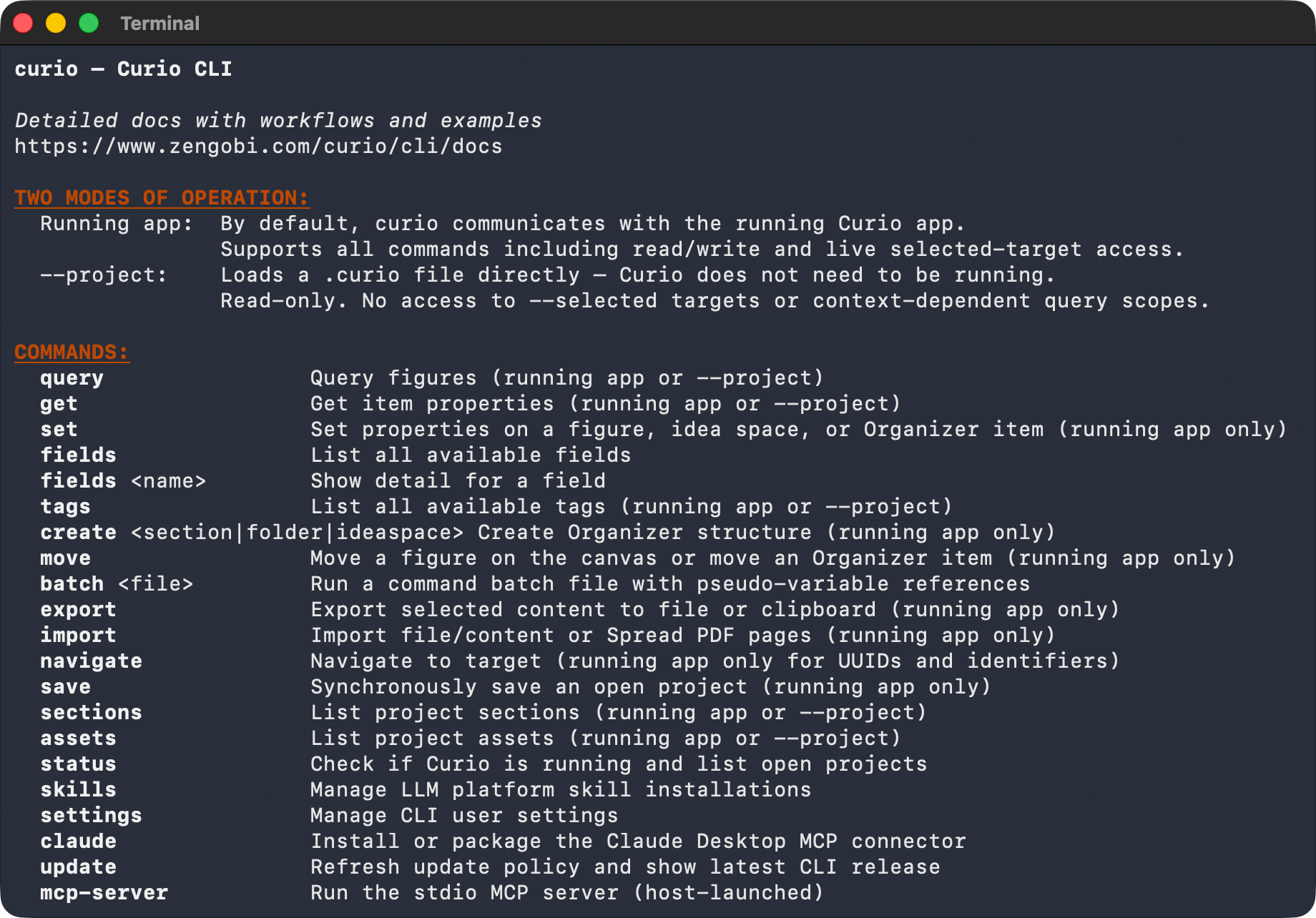
Curio CLI and MCP Server Pro sustainers The
curiocommand lets Terminal users and shell or Python scripts work with Curio projects. Bundled skills give command-line agents such as Codex and Claude Code the same access, while the built-in MCP server supports compatible hosts such as Claude Desktop. Together they can query and rewrite figures, set metadata, import and export, build the Organizer, and navigate without driving the user interface. -
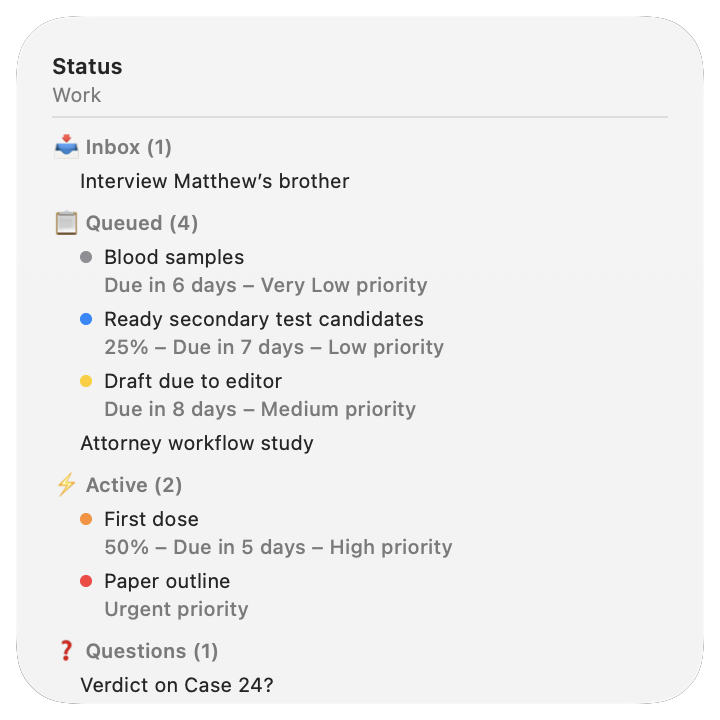
macOS Widgets The Status widget on the macOS Desktop mirrors Curio Pro’s Status shelf, showing tasks from every project with the shelf’s current grouping and sorting. A Query widget displays results from a specific saved query. Click any item to open Curio and jump straight to it.
-
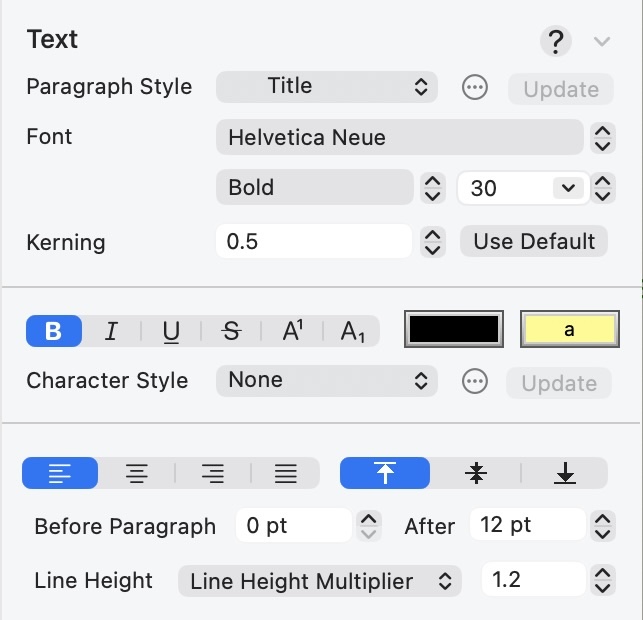
Paragraph and Character Text Styles The Text inspector with project-wide paragraph and character styles that update matching rich text across a project, plus new kerning, line height, and paragraph spacing controls. Curio Professional can also map Markdown styles to them.
-
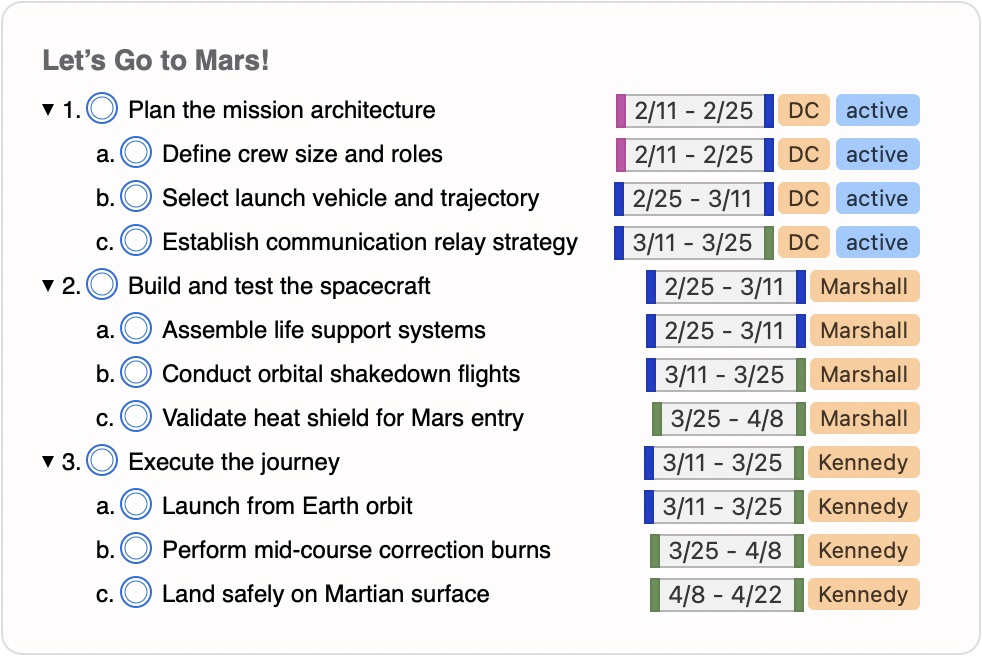
Flexible Adornment Positions Adornments can now sit at any of twelve positions around a figure, and checkboxes can be separated into their own margin. Here checkboxes line up with the outline numbering on the left while dates, resources, and tags gather into tidy columns on the right.
-
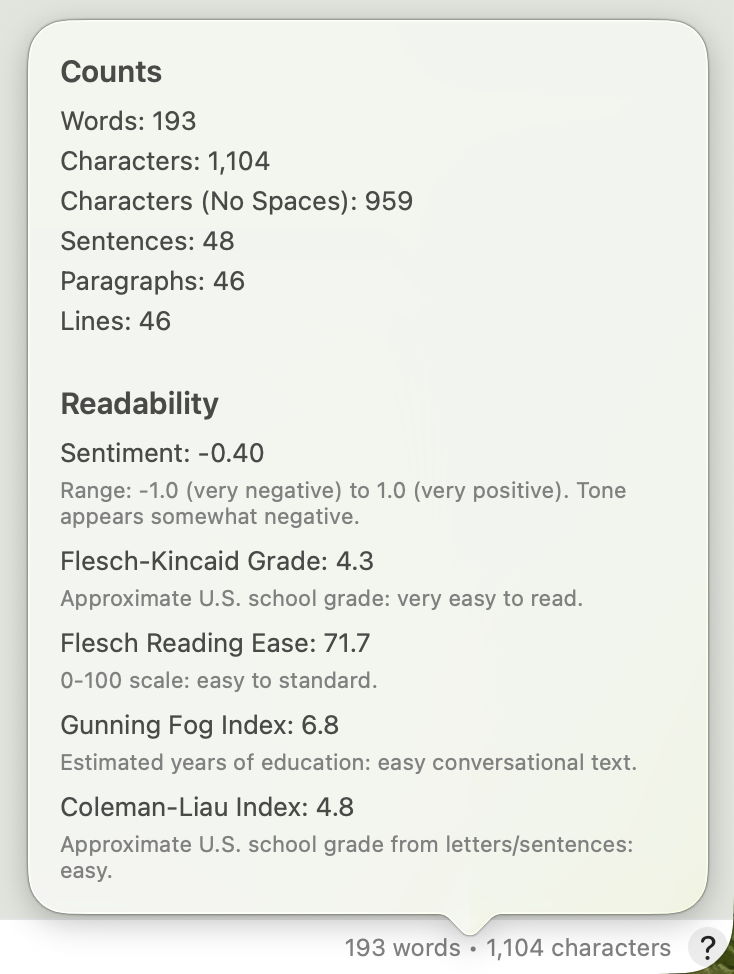
Word Count and Readability The Word Count status bar module tracks the current selection live, and its popover adds sentiment plus Flesch-Kincaid, Flesch Reading Ease, Gunning Fog, and Coleman-Liau scores, each with a plain-English reading.
Screenshots
The hero image is device-framed and ready to lead an article; everything below it is an unframed capture at 2880 × 1800. Click any image for the full-resolution PNG, or grab them all in the press kit.
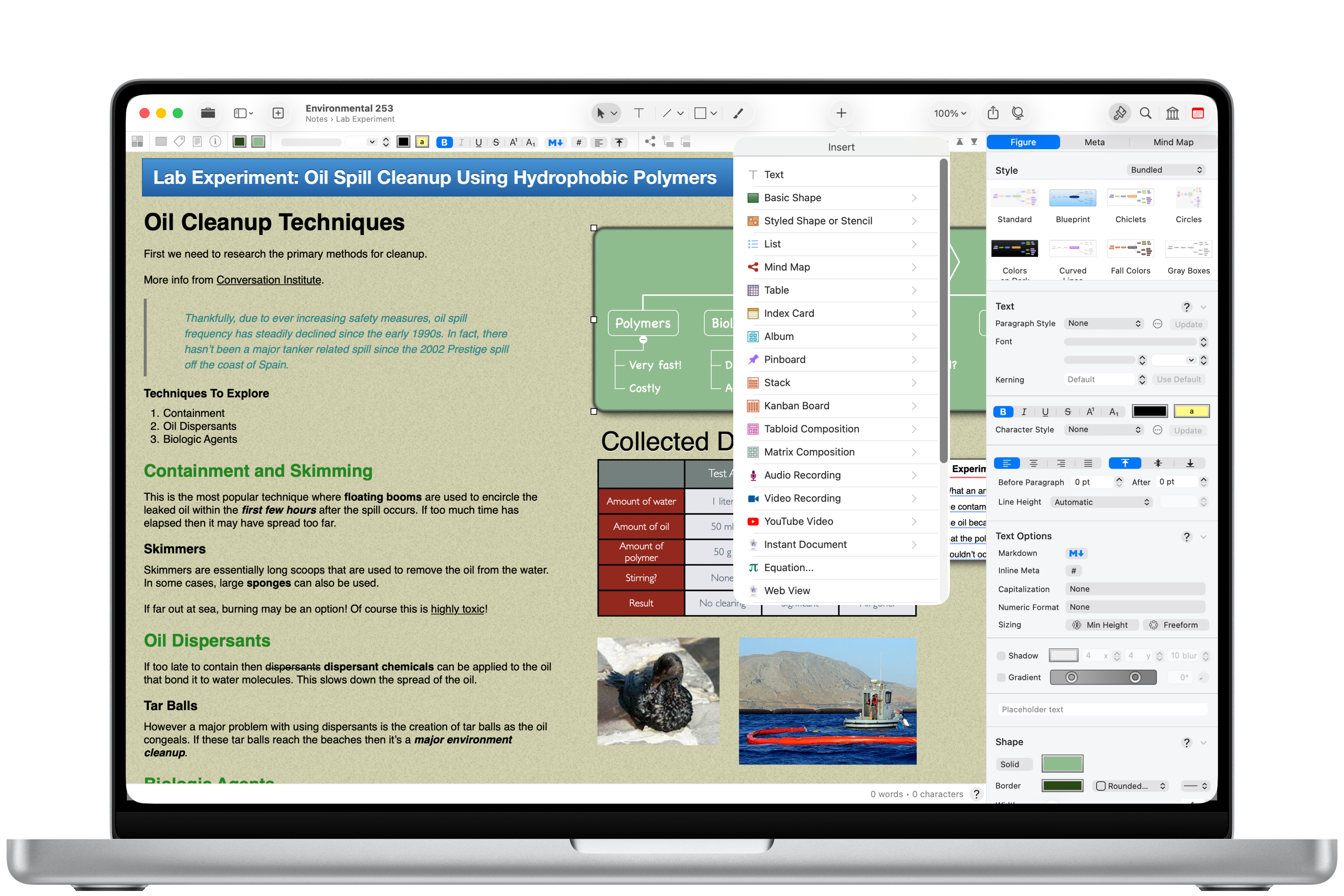
The image we lead with on the Curio home page. Unlike the captures below it’s device-framed rather than a raw screenshot, which makes it a natural lead image for an article or roundup.
-
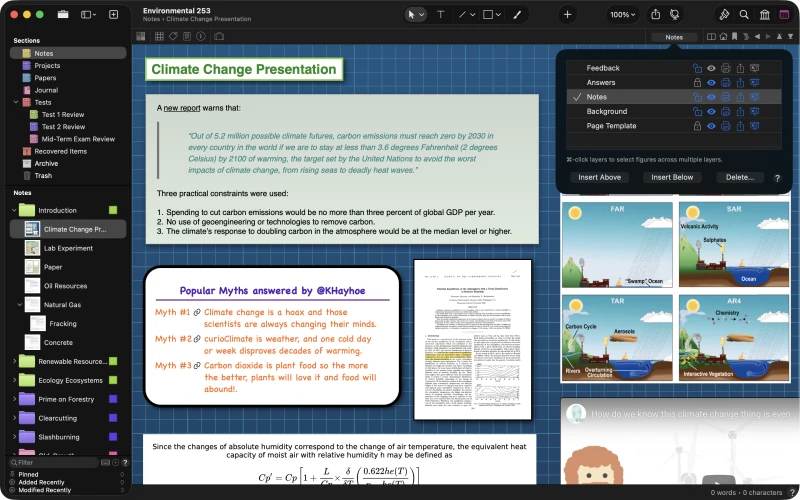
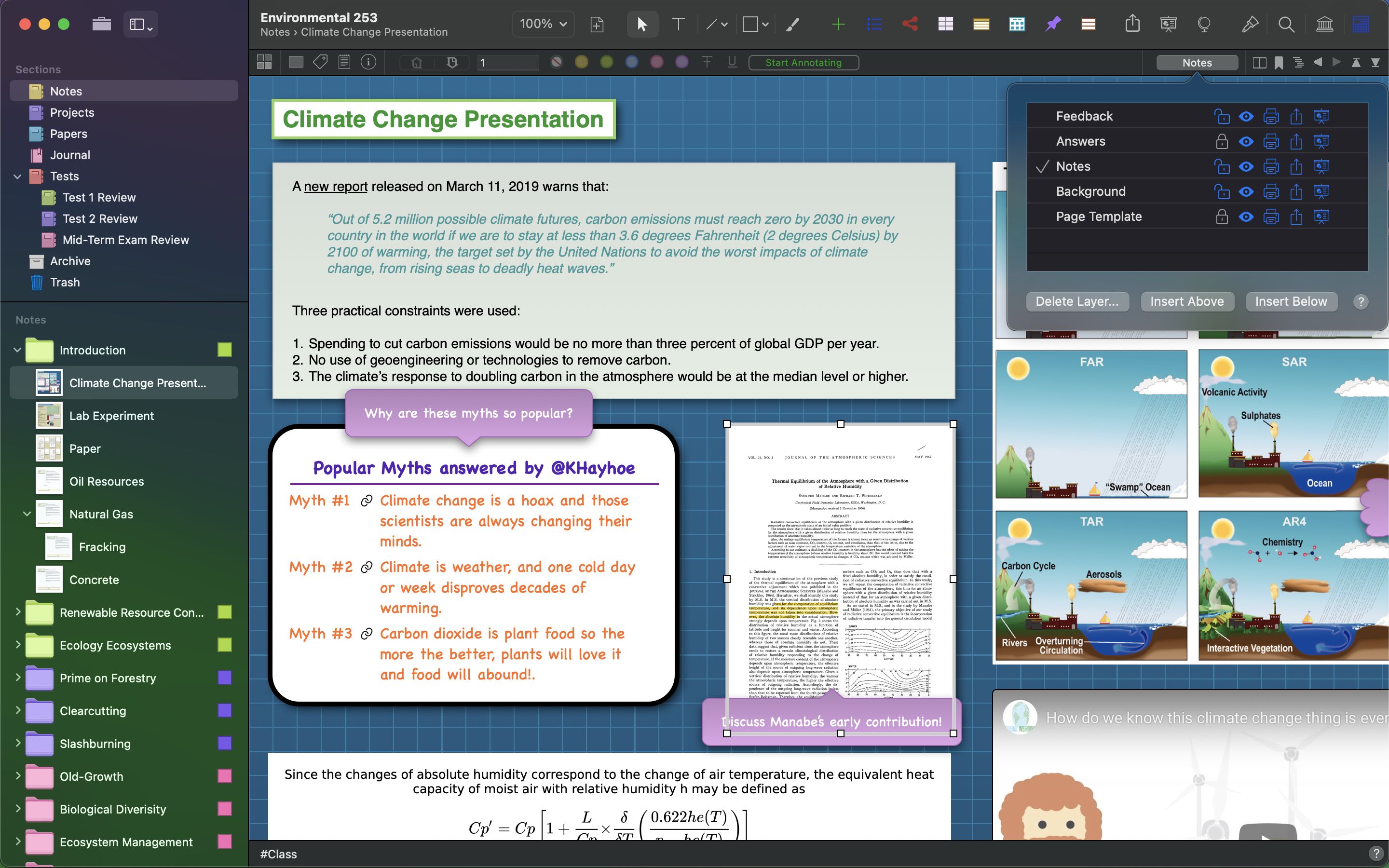
Freeform Idea Space A research idea space mixing rich text, a highlighted quote, hand-styled note cards, an embedded PDF, an equation, and a photo album. The Organizer sidebar is at left and the Layers popover at right.
-
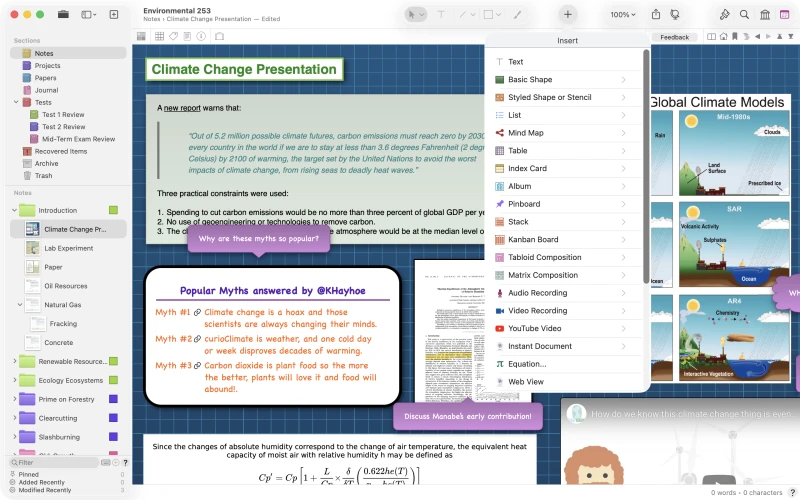
Insert Anything The Insert popover, offering text, shapes, stencils, lists, mind maps, tables, index cards, albums, pinboards, stacks, Kanban boards, compositions, audio and video recordings, equations, and live web views.
-
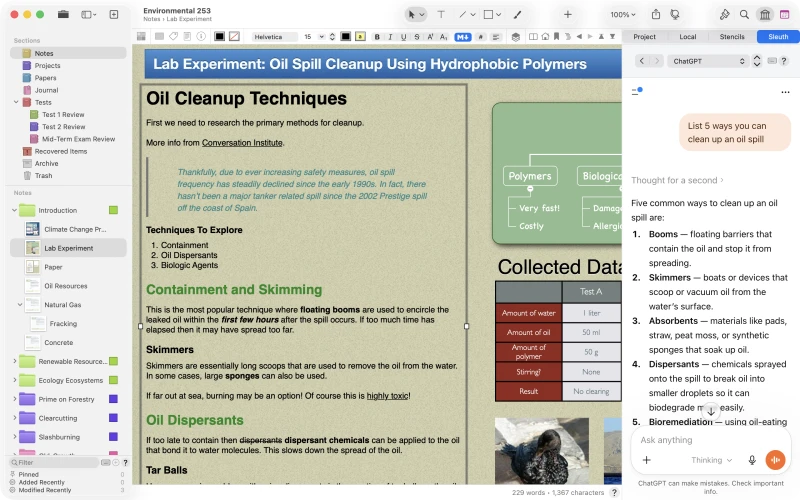
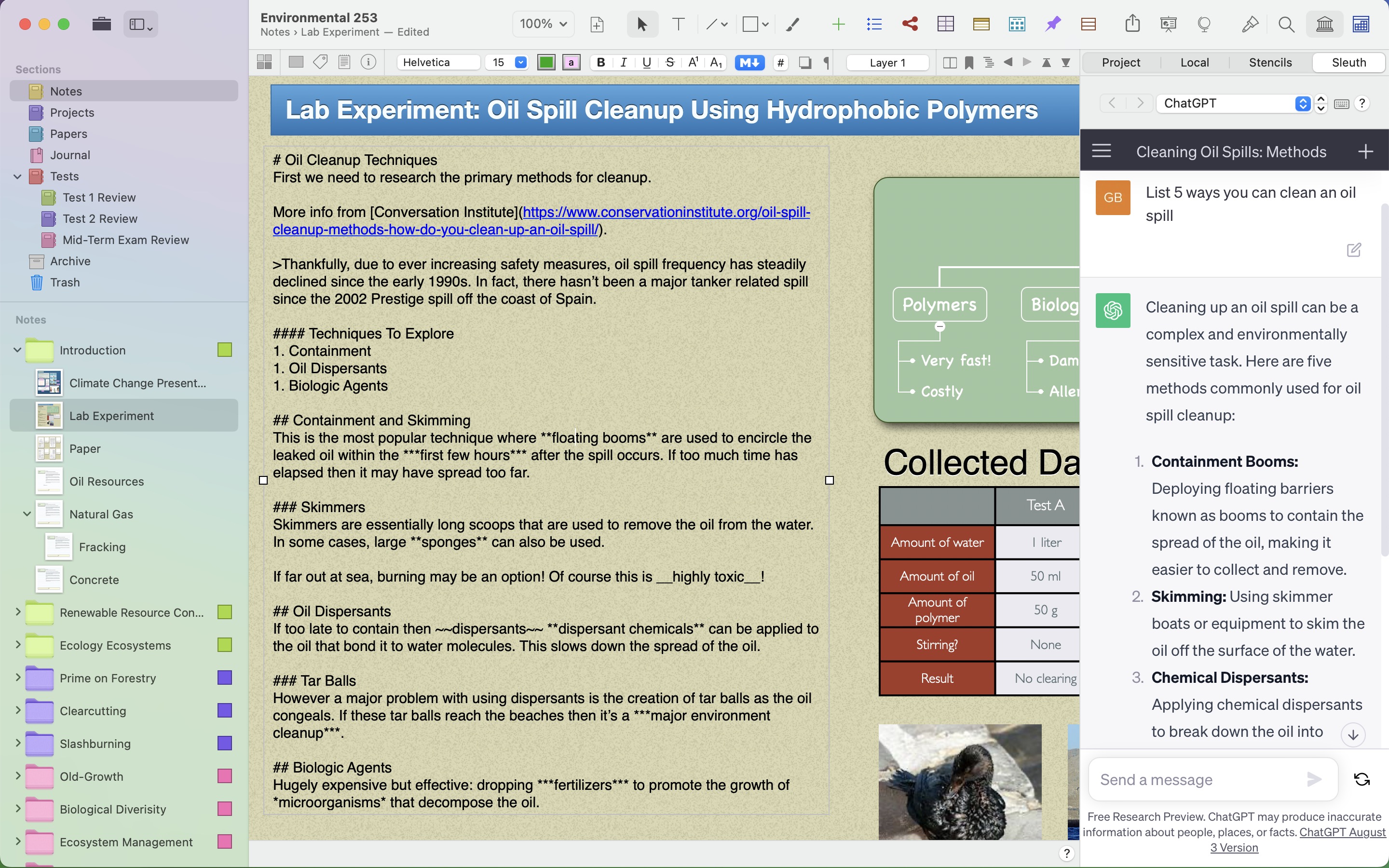
Research Alongside AI A long-form research note with Markdown formatting, an embedded mind map, and a data table, while the Sleuth shelf keeps ChatGPT open beside the work.
-
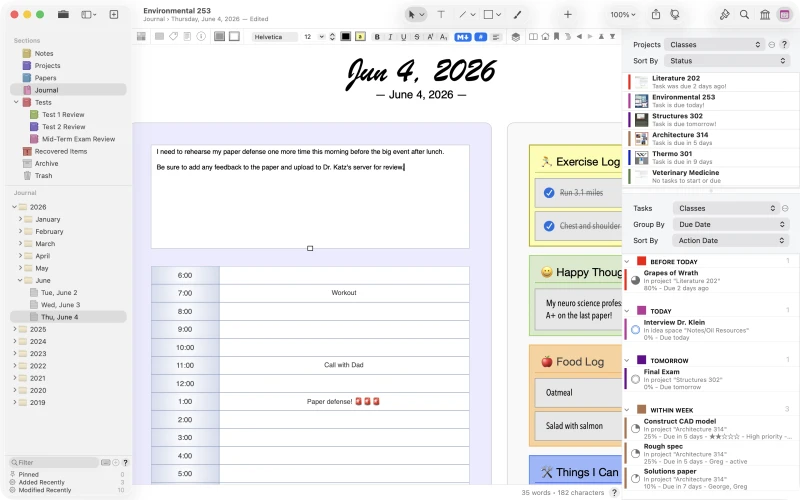
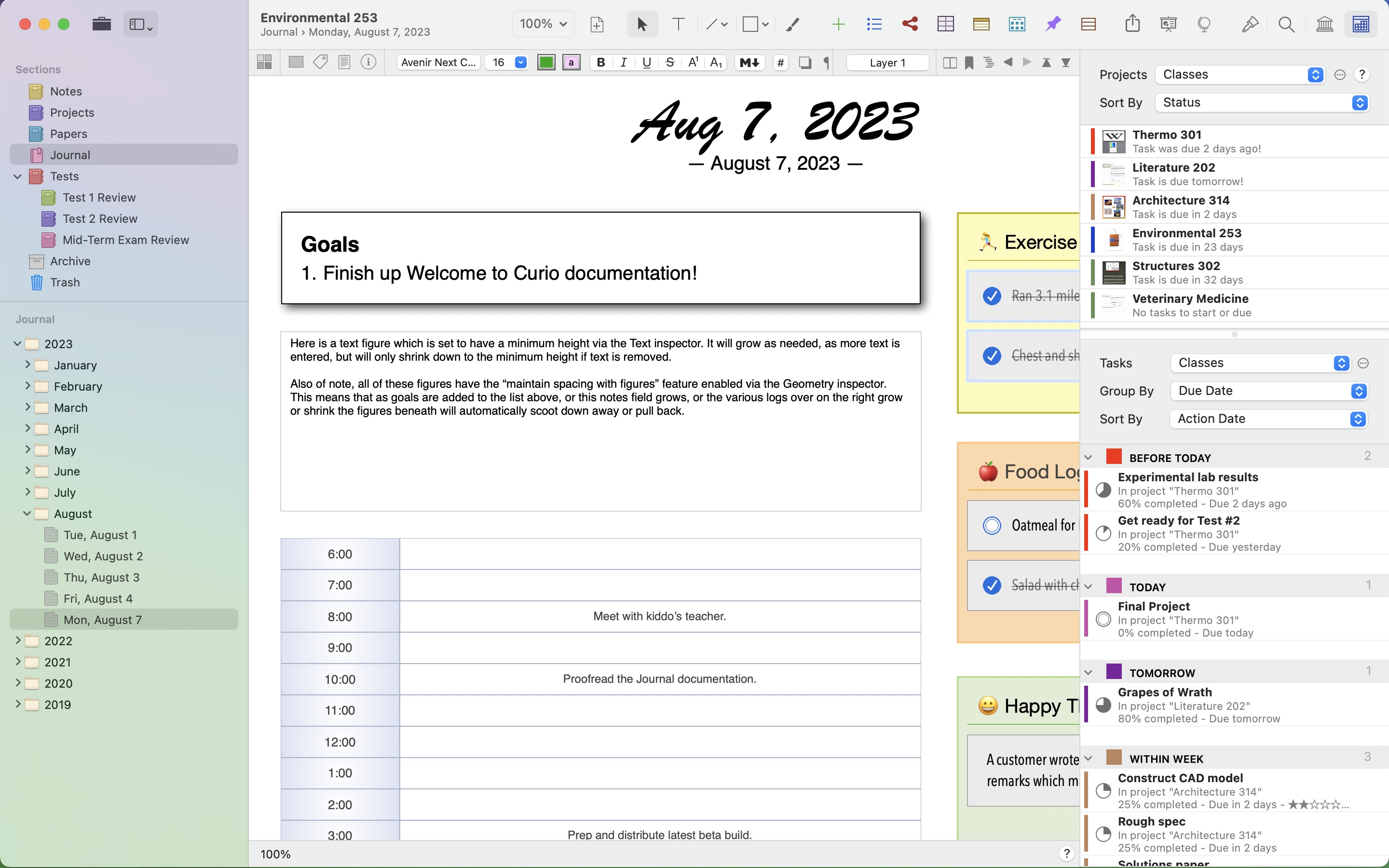
Journal and Status Shelf Curio’s integrated Journal for daily class or meeting notes, with the cross-project Status shelf at right aggregating tasks from every open project by due date.
-
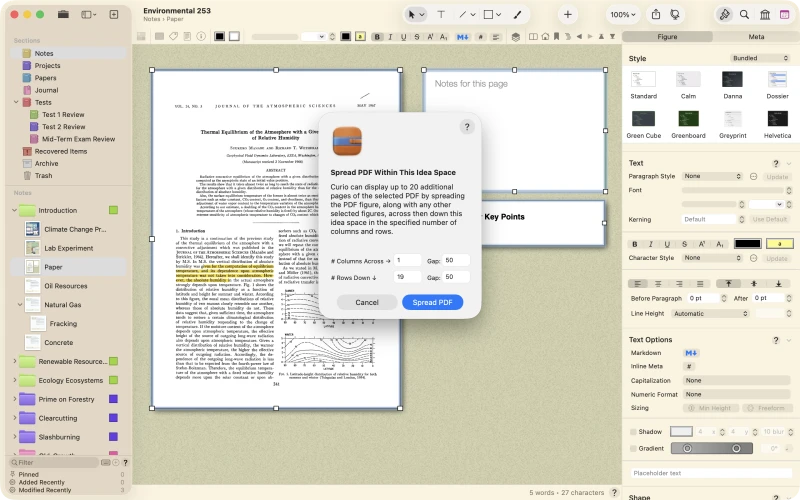
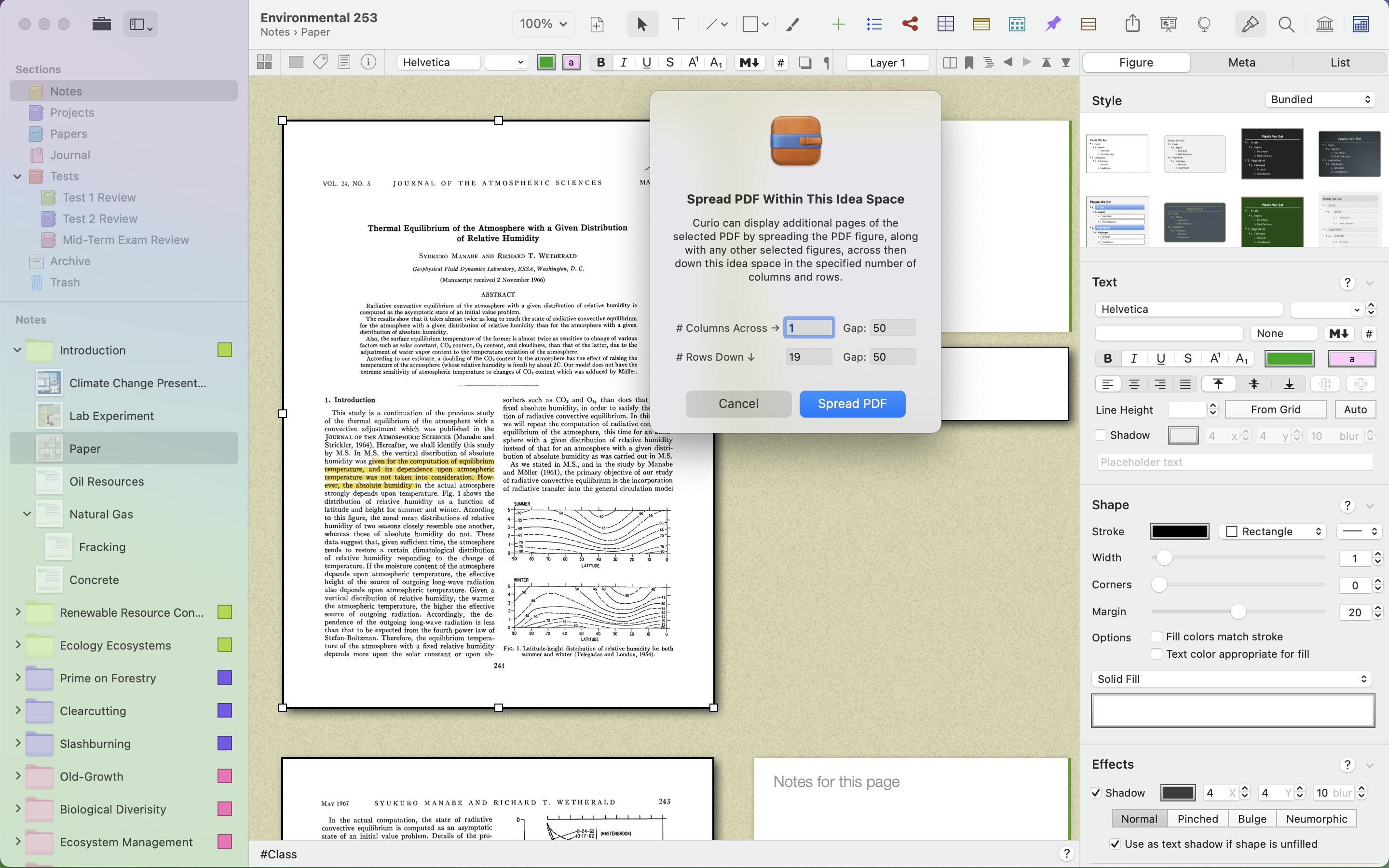
Spread a PDF for Annotation Spread PDF lays the pages of a document across one or more idea spaces so notes and annotations can sit alongside each page.
-
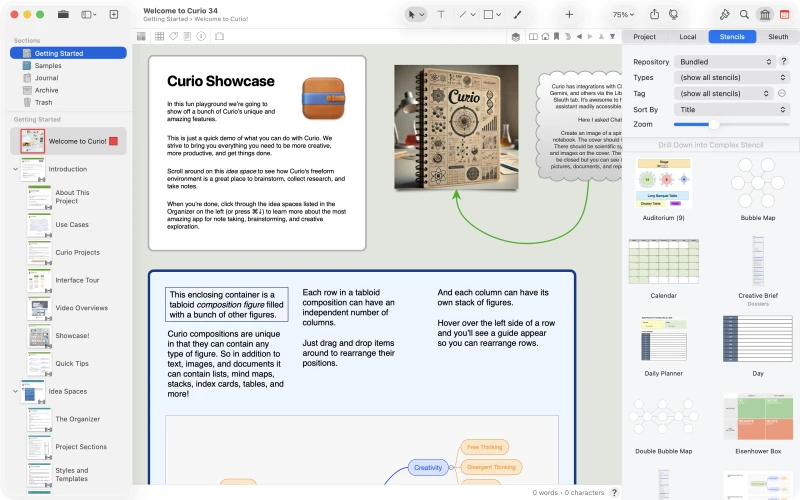
Welcome to Curio The bundled Welcome to Curio project that opens on first launch, shown with a tabloid composition and the Stencils shelf of bundled and custom stencils.


Brand Assets
The Curio app icon and the Zengobi logo. Please don’t recolor, distort, or rebuild them.
-
 Curio app icon
512 × 512 PNG
Curio app icon
512 × 512 PNG
-
Curio app icon
256 × 256 PNG
-
 Curio app icon
128 × 128 PNG
Curio app icon
128 × 128 PNG
-
 Zengobi logo
256 × 256 PNG
Zengobi logo
256 × 256 PNG
-
 Zengobi logo
SVG
Zengobi logo
SVG
Video walkthroughs and feature overviews are on our video page and YouTube channel.
Every screenshot and brand asset on this page, plus a plain-text fact sheet · 28 MB
Curio Standard and Professional
Curio ships in two editions. A feature-by-feature comparison is on the Curio home page.
Both Curio Standard and Curio Professional include:
- Freeform idea spaces and rich text, Markdown, document, image, PDF, audio, and video figures
- Mind maps, lists, tables, cards, albums, pinboards, stacks, Kanban boards, compositions, and focus mode
- Shapes, lines, pens and brushes, equation editing, templates, stencils, and paragraph and character text styles
- Search with tags, checklists, task priorities, ratings, resources, start/due dates, and regular expressions
- A live word count with readability and sentiment details
- Import and export options, PDF export, powerful PDF import, and Calendar and Reminders syncing
- An integrated research browser with support for popular AI and web services
- Native Shortcuts actions and a macOS Query widget
Curio Professional adds:
- Smart Kanban boards and other query-based collections
- Formulas in native and Markdown tables
- Synced figure and collection instances, text backed by external files, and figures synced with files
- Mermaid diagrams, syntax-highlighted code blocks, layers, and references between figures
- Project-wide status tracking and a macOS Status widget
- Custom data, variables, master templates, presentation mode, custom appearance themes, project passwords, and more
- The Curio CLI and its MCP server for Terminal and AI agent automation, available as a separate download for Pro sustainers
Pricing and Availability
Curio is sold two ways: a one-time license key from our website, or a subscription from the Mac App Store. Both unlock nearly identical feature sets. All prices are US dollars.
License keys (zengobi.com)
| Edition | New license | Academic | Upgrade | Academic upgrade |
|---|---|---|---|---|
| Curio 34 Professional | $119.99 | $99.99 | from $79.99 | from $69.99 |
| Curio 34 Standard | $99.99 | $79.99 | from $59.99 | from $49.99 |
A license key is a one-time purchase that includes a full year of free major and minor updates. Curio doesn’t expire when that year ends; it simply stops receiving updates until the license is renewed. Crossgrades and volume discounts are available, with an automatic 20% discount on quantities of 20 or more. See the License Key FAQ.
Subscriptions (Mac App Store)
| Edition | Billed yearly | Billed monthly |
|---|---|---|
| Curio Professional | $6 / month | $8 / month |
| Curio Standard | $5 / month | $6 / month |
Apple handles billing and renewals, and all updates arrive automatically. Academic and volume discounts aren’t available on subscriptions. See the Subscription FAQ.
Trial and free mode
Curio is a free download from our website, with no account or payment details required. On first launch, it begins a two-week trial with every Professional feature enabled and opens the bundled Welcome to Curio project for a guided tour. When the trial ends without a purchase, Curio keeps working in free mode with the Standard feature set and projects of up to five idea spaces; larger projects open read-only for viewing, exporting, and printing.
Curio CLI and MCP
The Curio CLI is an extra perk for Curio Professional sustainers with either an active Mac App Store subscription or a traditional Curio license within its current update window. There is nothing extra to buy, and the Curio CLI works with both the website and Mac App Store editions of Curio. The companion product is covered in full in Curio CLI and MCP Server below.
Curio CLI and MCP Server Pro sustainers
A companion product to Curio rather than a feature inside the app. It is downloaded and versioned separately, with its own documentation, release notes, and examples.
The Curio CLI is an extra perk for Curio Professional sustainers with either an active Mac App Store subscription or a traditional Curio license within its current update window.
Curio 34 also introduces the curio command-line tool. It is a separate, free, Apple-notarized download rather than part of the app, so protocol and security updates can ship independently of Curio releases. It works with both the website and Mac App Store editions.
It runs two ways. Pointed at the running app it gets the complete command set, including read/write access and the current selection; pointed at a .curio file with --project it reads straight from disk without launching Curio, so unattended reporting and analysis cannot modify a project.
Bundled skills give command-line agents such as Codex and Claude Code programmatic access to the CLI, while the built-in MCP server provides the same commands to compatible hosts such as Claude Desktop. These tools can query and edit a project without driving Curio’s user interface.
What the CLI can do
- Query a project or the whole Project Center with Curio’s own search language and get JSON back.
- Read and rewrite figure text, tags, dates, priorities, ratings, checkboxes, and custom data.
- Import content into idea spaces and export figures, collections, and whole projects.
- Build and navigate the Organizer, and jump the app to any result.
- Serve the same commands to AI agents over MCP, with bundled skills for common workflows.
Links for reviewers
Curio CLI overview
The landing page for the tool: what it does, who gets it, and how the two modes differ.
CLI documentation
Full command reference, installation and update guidance, settings, and AI agent setup.
CLI examples
Downloadable recipes and step-by-step tutorials showing finished things people build with the CLI.
CLI release notes
New commands, improvements, fixes, and the app and macOS versions each release requires.
CLI download
The signed, notarized universal installer for Apple silicon and Intel Macs. This link starts the download immediately.
From the CLI Examples
The examples are the quickest way to see what the CLI is actually for. Both below are free downloads with complete source, and both are good candidates for a screenshot or a demo in a story.
About the Developer
George Browning is the solo indie developer behind Curio. He founded Zengobi in North Carolina and began working full-time on Curio in 2002. The first version grew out of prototypes tested with a focus group of designers, with the goal of combining the freedom of a whiteboard, sketchbook, and notebook with the organization of lists, mind maps, and index cards.
Curio 1.0 shipped in early 2004 and has remained in continuous development ever since, earning innovation awards and a customer base that includes students, professors, engineers, designers, lawyers, writers, entrepreneurs, and filmmakers. More is on our about page.
Press Contact
George Browning, Founder, Zengobi, Inc.
Mention your publication and deadline, and I’ll get back to you quickly. I’m happy to provide a review license and answer any questions.